fix graphics/arrows command
Syntax
fix ID group-ID graphics/arrows Nevery mode keyword args ...
ID, group-ID are documented in fix command
graphics/arrows = style name of this fix command
Nevery = update graphics information every this many time steps
mode = one of the following modes dipole or force or velocity or variable or chunk
dipole args = scale radius
  scale = scale factor for the dipole moment to determine the arrow length
  radius = radius for arrows (length units)
force args = scale radius
  scale = scale factor for the force vector to determine the arrow length
  radius = radius for arrows (length units)
velocity args = scale radius
  scale = scale factor for the velocity vector to determine the arrow length
  radius = radius for arrows (length units)
variable args = xval yval zval radius
  xval = x value for arrow vector (may be a variable)
  yval = y value for arrow vector (may be a variable)
  zval = z value for arrow vector (may be a variable)
  radius = radius for arrows (length units)
chunk args = chunk-ID pos-ID vec-ID scale radius
  chunk-ID = ID of compute chunk/atom command
  pos-ID = ID of a per-chunk compute that computes the positions for the arrows
  vec-ID = ID of a per-chunk compute that computes the arrow vectors
  scale = scale factor for the per-chunk vector to determine the arrow length
  radius = radius for arrows (length units)
zero or more keyword/value pairs may be appended
keyword = autoscale
autoscale value = automatically scale arrows so they have an average length of "value"
Examples
fix vec all graphics/arrows 10 velocity 20.0 0.066 autoscale 0.5
fix vec all graphics/arrows 100 variable v_xnorm v_znorm 0.0 0.066
fix vec all graphics/arrows 100 chunk molchunk com dip 1.0 0.05
Description
Added in version 11Feb2026.
This fix allows to add arrows to images rendered with dump image using the fix keyword to represent vector properties with arrows for either all atoms in the fix group or for chunks.
The group-ID sets the group ID of the atoms selected to have the selected property represented. This may be a dynamic group.
The Nevery keyword determines how often the arrows graphics data is updated. This should be the same value as the corresponding N parameter of the dump image command. LAMMPS will stop with an error message if the settings for this fix and the dump command are not compatible.
There are five keywords available that determine what is shown: dipole will show the per-atom dipole vector, force the per-atom force, velocity the per-atom velocity, variable a custom vector constructed from three constants or atom- or equal-style variables. With the chunk keyword the arrows shown will represent per-chunk vector data.
The xval, yval, and zval, arguments to the variable mode define a custom vector that can be composed of numbers or atom- or equal-style variables. If any of these values is a variable, it should be specified as v_name, where “name” is the variable name. In this case, the variable will be evaluated each timestep, and its value used to define the arrow for each atom. Since variables can reference computes, fixes, custom per-atom properties, and other variables, this can be used to construct arrows for almost any per-atom property available in LAMMPS.
The chunk-ID is the ID of a compute chunk/atom command. In LAMMPS, chunks are collections of atoms and there are per-chunk computes that compute properties for them. See the compute chunk/atom and Howto chunk pages for details of how chunks can be defined and examples of how they can be used to measure properties of a system.
The pos-ID is the ID of a per-chunk compute command. Most commonly this will be either compute com/chunk for “mobile” chunks or compute compute property/chunk for binning based chunks. The vec-ID is the ID of a per-chunk compute command. Either per-chunk compute must return a global array with at least 3 columns and only the first three columns are used for the arrows. For computes that compute a tensor only the trace of the tensor is used. Currently the following computes are compatible:
gyration/chunk (with optional tensor keyword)
property/chunk (with arguments coord1 coord2 coord3)
reduce/chunk (with three or more properties)
The scale quantity determines the length of the arrows. It should be chosen so that when multiplied with the per-atom vector quantity the result is of the same order of magnitude as atom positions, so that the vectors can be seen well.
The radius quantity determines the width of the arrows.
The optional autoscale keyword allows to dynamically determine the scale quantity so that the average length of the arrows is set to the value of the keyword’s argument. The computed scale factor can be accessed by various output commands as a global scalar (see below).
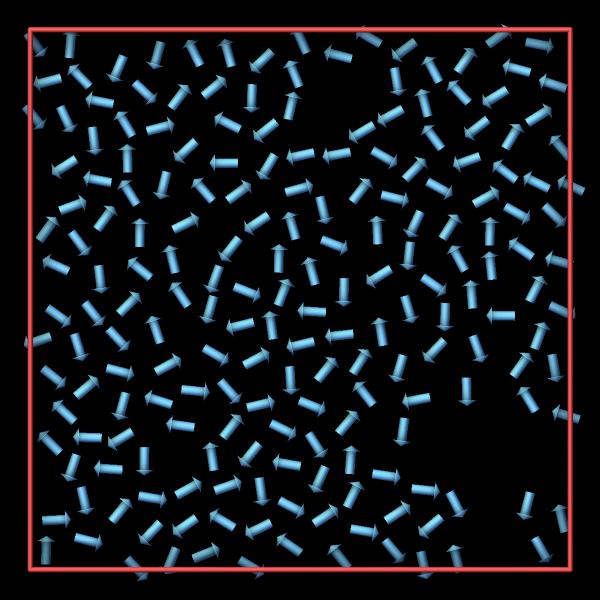
A simple example to use fix graphics/arrows to represent point-dipole
particles for the examples/dipole/in.dipole input is given below:
variable dumpfreq index 250
fix      arrows   all graphics/arrows ${dumpfreq} dipole 1.2 0.15
dump     viz      all image ${dumpfreq} dipole-2d-*.ppm type type atom no &
                      size 600 600 zoom 1.8 shiny 0.2  fsaa yes ssao yes 31257 0.3 &
                      box yes 0.015 fix arrows const 0 0  center s 0.5 0.5 0
dump_modify  viz pad 6 fcolor arrows steelblue ftrans arrows 1
Dump image info
Added in version 11Feb2026.
Fix graphics/arrows is designed to be used with the fix keyword of dump image. The fix will add arrows based on the atoms in the fix group or based on chunks to dump image so that they are included in the rendered image.
The color of the arrows is by default that of the atoms when using color styles “type” or “element”. With color style “const” the default value of “white” can be changed using dump_modify fcolor. The transparency is by default fully opaque and can be changed with dump_modify ftrans.
The fflag1 setting of dump image fix allows to adjust the length of the arrows. Since that value is already set or computed by the fix, fflag1 should be set to 0.0.
The fflag2 setting allows you to adjust the radius of the rendered arrows. Since the radius of the arrows is an input parameter for this fix, it is recommended to set this flag to 0.0.
Restart, fix_modify, output, run start/stop, minimize info
No information about this fix is written to binary restart files.
None of the fix_modify options apply to this fix.
This fix computes a global scalar representing the current scale factor for displaying the arrows, which can be accessed by various output commands. This is the autoscale keyword argument value divided by the average length of the selected vector property. If the autoscale keyword is not used, it is the scale value set by the fix graphics/arrows command or 1.0. The scalar value calculated by this fix is “intensive”.
Restrictions
This fix is part of the GRAPHICS package. It is only enabled if LAMMPS was built with that package. See the Build package page for more info.
The dipole mode requires the use of atom style dipole or a hybrid atom style that includes it.
Default
autoscale is off by default